


Managing food safety across multiple restaurants, cafés, takeaways or other food businesses can quickly become complicated. SFBB Pro makes multi-site food safety management simple by allowing you to add multiple locations to one SFBB Pro account.
For just £12.95 per month for each additional location, you can manage your sites centrally while giving each location its own administrator to handle day-to-day food safety records.
How to Add Another Location to SFBB Pro
Adding a new location takes just a few minutes.
Log in to your SFBB Pro website admin account, go to your account and select Add Location.
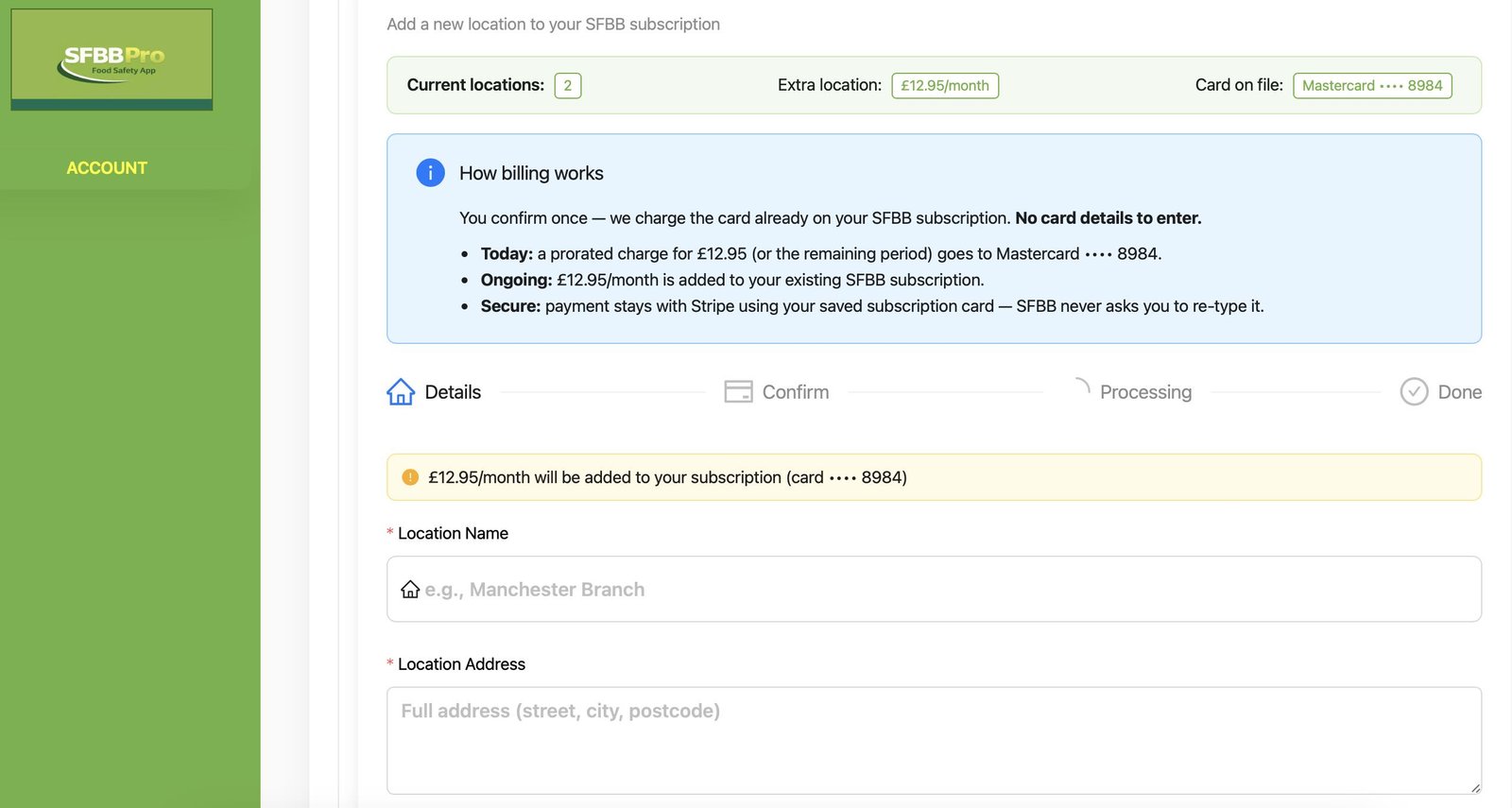
You’ll see your existing locations along with the cost of adding another site:
Add Location – +£12.95/month
Enter the details for your new site:
- Location Name
- Location Address
- Location Phone (optional)
You can then choose whether you want to copy selected settings and information from one of your existing SFBB Pro locations.
Copy Your Existing Food Safety Setup
Setting up another restaurant doesn’t mean you have to start everything again.
SFBB Pro gives you the option to copy useful setup information from an existing location into your new site, including:
- Suppliers
- Label products and categories
- Due times
- Opening hours
- Alert settings
Importantly, historical food safety information remains completely separate between locations. Completed records, reports, staff, deliveries and temperature records are never copied to the new location.
The new Location Administrator can then configure the site’s checklists using the SFBB Pro setup wizard.
Assign a Location Administrator
Next, assign an administrator to manage the new location.
Simply enter their:
Administrator Name
Administrator Email
The Location Administrator can then take responsibility for that site’s day-to-day food safety management, including food safety records, staff and checklists.
This allows a business owner or senior manager to oversee multiple locations through SFBB Pro while individual managers carry out the required food safety duties at their own sites.
How Does Billing for Additional SFBB Pro Locations Work?
Each additional SFBB Pro location costs £12.95 per month.
There’s no need to enter your payment card details again. When you confirm the new location, SFBB Pro uses the card already securely associated with your existing subscription through Stripe.
When adding a location:
- Today: You’ll pay a prorated amount of the £12.95 monthly fee based on the remaining period of your current billing cycle.
- Ongoing: £12.95/month is added to your existing SFBB Pro subscription.
- No new card details: Your existing subscription payment method is used automatically.
- Secure payments: Your payment details remain securely handled by Stripe.
Once you’ve checked the location and administrator information, select Continue to confirm and complete the process.
Manage Multiple Restaurants from One SFBB Pro Account
The multi-location feature has been designed for food businesses that operate more than one site but want a straightforward way to oversee food safety compliance.
Rather than maintaining completely separate systems for every restaurant, café, takeaway or food premises, you can keep your locations under the same SFBB Pro ownership account while still maintaining separate food safety records for each individual site.
This is particularly useful for:
- Restaurant groups
- Multi-site cafés
- Pub and hospitality groups
- Takeaway chains
- Franchise operators
- Catering businesses with multiple premises
- Growing independent food businesses opening their second or third location
A Simpler Way to Manage Multi-Site Food Safety
As your food business grows, your food safety system needs to grow with it.
With SFBB Pro multi-location management, you can add new premises to your existing account, copy key setup information, assign a dedicated Location Administrator and keep each site’s food safety records organised independently.
There is no need to create an entirely new SFBB Pro account or enter new payment details every time your business expands.
Simply:
Log in to SFBB Pro → Go to your Account → Select Add Location → Enter the location details → Assign a Location Administrator → Confirm.
Your additional location is then added to your SFBB Pro subscription for £12.95/month.
Add Your Next Location to SFBB Pro
Whether you’re opening your second restaurant or managing a growing group of food businesses, SFBB Pro gives you one straightforward system for managing food safety across multiple locations.
Log in to your SFBB Pro website admin today and select “Add Location” to get started.




No comment